Advanced React
This workshop moves from the React concepts that describe a screen to the patterns used in a production application.
Prerequisites
- Basic knowledge of HTML, CSS and JavaScript.
- Familiarity with modern JavaScript syntax (ES6+).
- Basic understanding of APIs and asynchronous programming.
What is React?
React is a JavaScript library for building user interfaces. It is not a programming language, and React alone does not prescribe every part of an application in the way a full framework does.
React lets us describe what the UI should look like for the current data. When that data changes, React updates the relevant parts of the page.
JSX
JSX is a syntax extension that lets us describe UI with JavaScript-like markup:
1 2 3 | |
Browsers do not run JSX directly. A build tool transforms it into JavaScript that creates React elements.
DOM and React DOM
The DOM is the browser's in-memory representation of a web page. React DOM is the package that renders React components into that browser DOM.
How React updates the UI
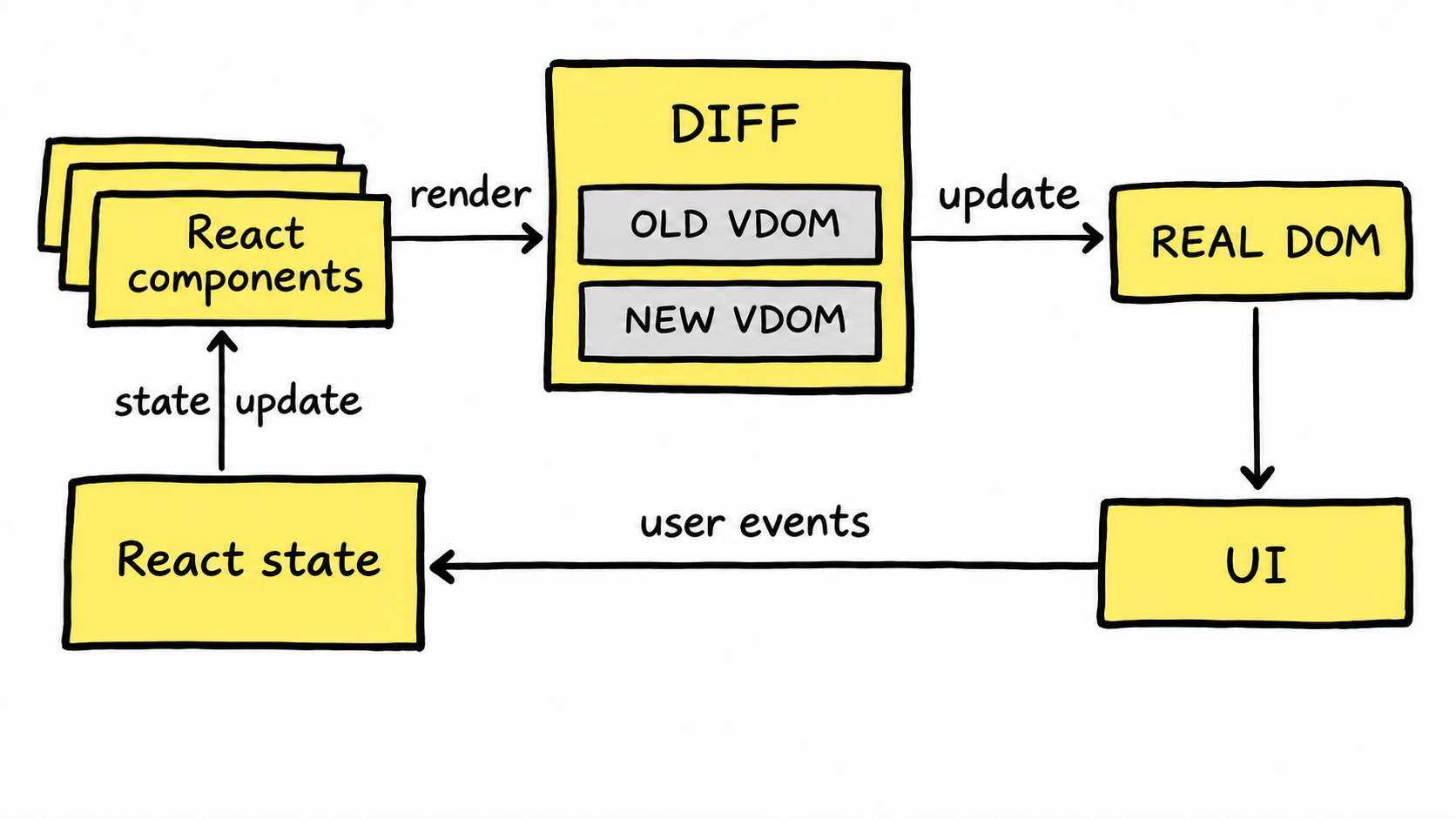
- Components describe the next UI.
- React compares the new virtual DOM with the previous virtual DOM. This comparison is called reconciliation.
- React DOM commits only the required changes to the browser DOM.
- The browser paints the visible UI.
- A user event can update React state, which starts the cycle again.
React's virtual DOM is a JavaScript representation of the UI, not a second browser DOM.
Components, props, and composition
Components are reusable functions that return UI. Props are inputs passed into those components. Composition combines small components into a page.
1 2 3 4 5 6 7 8 9 10 11 12 13 14 15 16 17 18 | |
This keeps the page readable, makes behaviour easier to test, and lets the same component be reused with different data.
Component lifecycle and re-rendering
A component's lifecycle is its complete time in an application: mount, render, effects, and unmount.
A re-render is one new render during that lifecycle. It is commonly triggered by changed state, props, or context. React then updates the browser DOM only where it needs to.
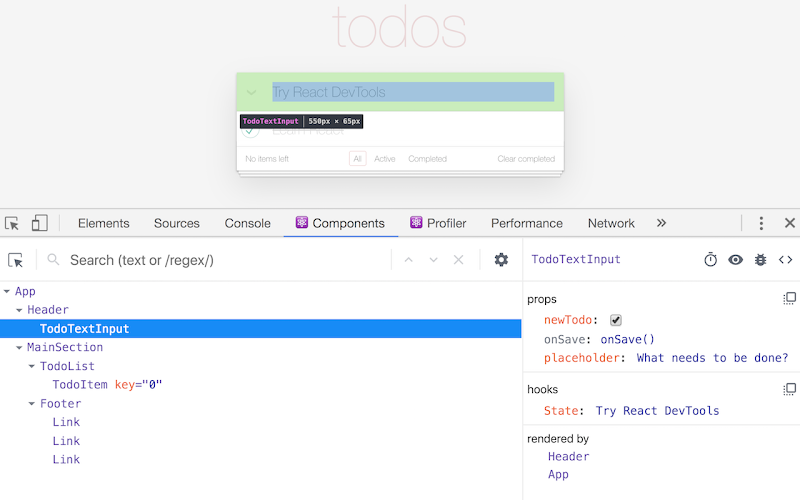
Dev tool
State and events
State stores data that can change over time and affects what appears on screen. An event handler updates the state; React then re-renders the component.
1 2 3 4 5 6 7 8 9 10 11 12 13 14 15 16 17 | |
The flow is:
- The user types a name.
- The event handler calls
setName. - React schedules a re-render with the new state.
- React DOM updates the affected browser DOM.
- The browser paints the new screen.
React hooks
Hooks let function components use React features such as state, context, refs, effects, and memoisation.
State hook: useState
useState stores a value that affects the UI. The setter updates that value and schedules a re-render.
1 | |
Use state for data the user should see change on screen.
Context hook: useContext
useContext reads shared data without passing it through every intermediate component as props.
1 | |
Good context candidates include the signed-in member, theme, locale, and app-level settings. Use ordinary props for data that is only needed by nearby components.
Ref hook: useRef
useRef keeps a value between renders without re-rendering the component when that value changes.
1 2 3 | |
Refs are useful for accessing a DOM element or storing an instance value such as a timer ID. Changing ref.current does not update the screen.
Effect hook: useEffect
useEffect synchronises a component with something outside React, such as a browser API, network subscription, or timer.
1 2 3 | |
Do not use an effect only to calculate UI from state you already have; derive that value during rendering instead.
Performance hook: useMemo
useMemo caches an expensive calculation until its inputs change.
1 2 3 4 | |
Measure first. useMemo is a performance tool, not a default habit.
References
What do we need for a real project?
React is the UI library. A real application also needs conventions, styling, type safety, UI components, and a reliable way to manage server data.
| Technology | Purpose |
|---|---|
| Next.js | Application framework and routing |
| TypeScript | Type safety |
| Tailwind CSS | Styling and responsive design |
| shadcn/ui | Reusable UI components |
| Axios | API requests |
| TanStack Query | Server state management, caching and fetching |
Next.js: React for production applications
Next.js is a widely used full-stack React framework. It provides file-based routing, rendering options, server-side code, and conventions for building complete web applications.
Pages Router and App Router
| Behaviour | Pages Router (pages/) |
App Router (app/) |
|---|---|---|
| Initial HTML generation | Server, at build time or request time | Server, at build time or request time |
| Browser hydration | Every component on the page ships JavaScript and hydrates in the browser. | Only components marked with "use client" ship JavaScript and hydrate. Server Components never run in the browser. |
Can you use useState or useEffect anywhere? |
Yes: page components render for initial HTML and hydrate in the browser. | No: only Client Components marked with "use client" can use client-only hooks. |
In the App Router, start with Server Components. Add "use client" only when a component needs browser-only behaviour, such as state, effects, event handlers, or browser APIs.
Demo
View demo code
In the demo project, explore how the pieces work together:
- Break down a page into individual components.
- Identify the props a component needs.
- Fetch server data with Axios and TanStack Query.
- Build the interface with Tailwind CSS and shadcn/ui components.
Key takeaways
- Understand how React works and interacts with the browser DOM.
- Understand how React renders and re-renders the UI in response to state changes.
- Understand component composition, lifecycle and commonly used React hooks.
- Understand Next.js, including routing, Server Components and Client Components.
- Navigate and understand a real-world React project structure.
- Understand how different technologies work together in a modern React application.